 The KlickDent suite
KlickClinic
Dental clinic software built around the tooth chart
KlickClinic is a complete management system for a single dental clinic, built around a per-patient interactive dental chart.
378 documented features
Explore KlickClinicThe KlickDent suite
KlickDent is three dental programs that talk to each other. Each one runs on your own computer, in English or Arabic, with or without the internet — and a case sent from a clinic arrives at the lab without anybody retyping it.
Three programs
Each is a complete program on its own and is sold on its own. When two of them run together, work moves between them without being retyped.
Dental clinic software built around the tooth chart
KlickClinic is a complete management system for a single dental clinic, built around a per-patient interactive dental chart.
378 documented features
Explore KlickClinicRun your whole dental lab from one program.
KlickLab is a complete management program for a dental laboratory: it takes in cases from dentists, moves them through your own production stages, tracks materials and implant parts, bills in Iraqi dinars, and pays your technicians for the work they actually did.
387 documented features
Explore KlickLabStock, sales and money for a dental supplies company.
KlickComp is a complete business program for a company that buys dental materials, equipment and software from suppliers and sells them on to clinics, labs, dentists and shops.
396 documented features
Explore KlickCompInside the programs
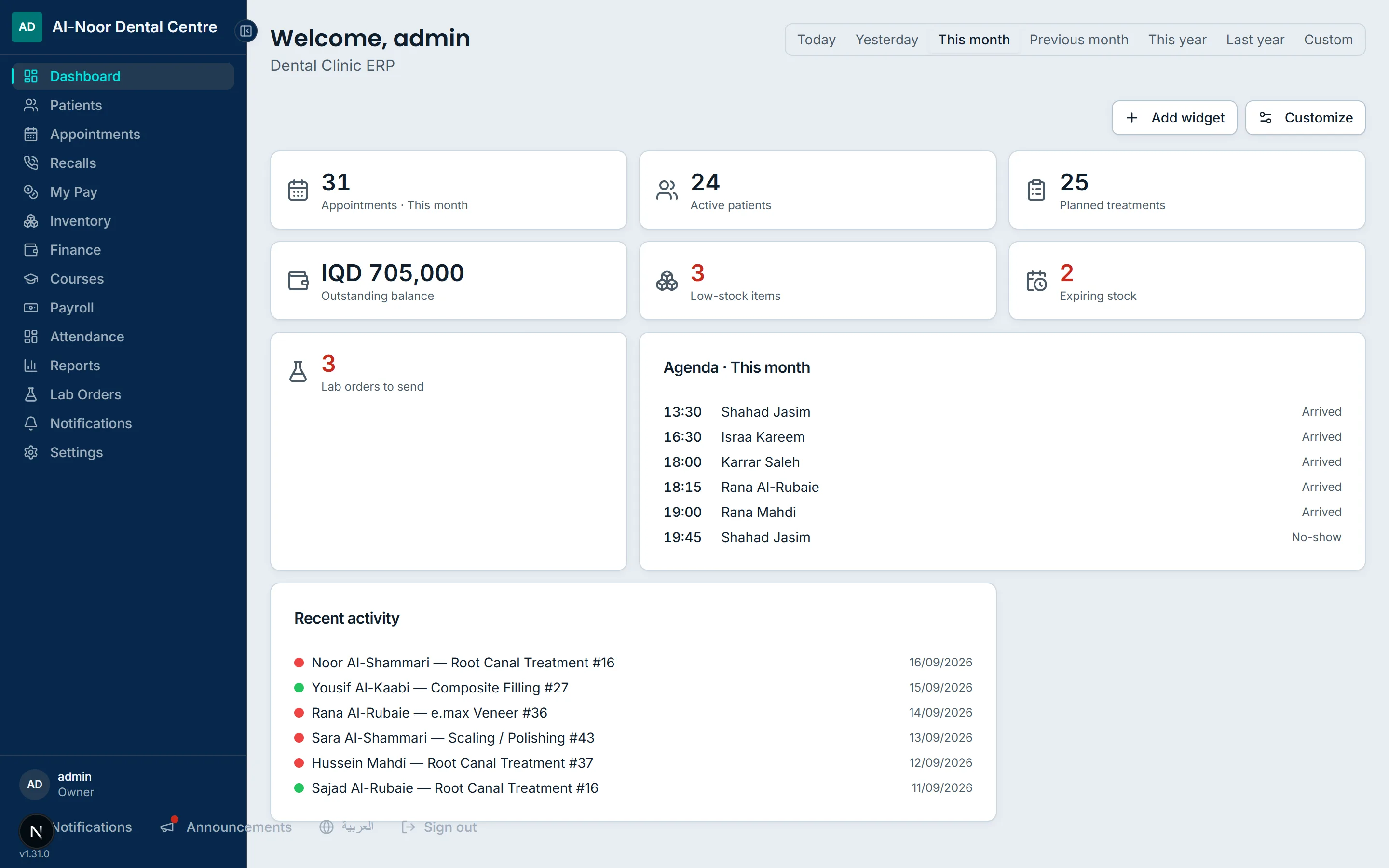
Real captures of the programs running, in your language, with demo data we invented. No mockups, and no real clinic’s records.
Why a suite?
A clinic writes the crown on a paper slip. Somebody photographs the slip and sends it to the lab on WhatsApp. The lab reads the photo, types it into their own book, and starts work. Nobody can say for certain which tooth, which shade, or which day it was promised.
Then the case comes back. The lab has a price in their book. The clinic has a different number in theirs. At the end of the month the two are reconciled by phone, from memory, and the difference is split because neither side can prove it.
None of that is a software problem inside the clinic, or inside the lab. Each of them may be perfectly organised on its own. The work is lost in the handover — and the handover is the one place a single program can never reach.
Step by step
KlickClinic runs the clinic. KlickLab runs the laboratory. KlickComp runs the company that supplies them both. Each is a complete program on its own and is sold on its own. What makes them a suite is the Control Hub: a single service both sides sign in to, which carries a case from the clinic to the lab and carries the status and the invoice back. The Hub hands each document over exactly once, so nothing is delivered twice and nothing goes missing in between.
In the clinic
The dentist opens the patient, taps tooth 26 on the chart, and plans a crown. The tooth, the shade, the material and the price are part of the record from that moment, because they were entered onto the chart rather than onto paper.
Between the two
A lab order is raised from that same chart entry, the scans are attached, and it goes to the connected laboratory through the Control Hub. The lab receives the tooth number, the shade and the due date as data — there is nothing to read off a photograph.
In the laboratory
The case appears in the lab’s own queue with the clinic and the dentist already attached. It moves stage by stage through the technicians who work on it, and every time its stage changes the clinic is told automatically.
When the work is done
The lab invoices the clinic from the cases themselves, at the price agreed with that clinic. There is no second book to keep, because the thing that was made and the thing that is billed are the same record.
Back in the clinic
The clinic sees the invoice against the cases it already has. Approving it charges each dentist their agreed share of the lab cost against their commission — so the month closes on numbers both sides can point at, not on a phone call.
True of all three
One Windows installer puts the whole program, its database and its web server on your own computer, and runs it as a service that starts with the machine. Your staff reach it from their phones on your own wi-fi. A day of clinical work and a day of money needs no internet at all.
Every label, every message and every printed page exists in both languages, and the whole layout mirrors for Arabic rather than merely being translated. Each person on your team picks their own language; the clinic sets the default.
The database sits on the computer you installed it on. You can back it up to a USB stick whenever you like, and the programs remind you to. A backup is a plain SQL file — it opens with standard tools, not only with ours. Nothing holds your records hostage.
Prices, payments, balances and payroll are kept in Iraqi dinars, typed into fields that group the thousands as you go. Supplier bills can carry a second currency, recording both what they settle and what actually left the till, so a different rate each time is fine.
Ready-made roles, with every module set to hidden, view or edit, plus separate switches for the sensitive things — patient phone numbers, the practice’s whole books. A dentist can see what they earned without seeing what the clinic earned.
All three keep a record of what was created, changed or deleted, with who did it and when — so a disagreement about a number becomes a question you can answer rather than argue about. KlickClinic goes further: removed treatments and visits wait in a list for 90 days and come back complete, with their sessions and their money.
Counted, not estimated
Every number here was counted in the programs’ own source. There is no customer testimonial anywhere on this site, and no clinic is named.
1,715
features documented on this site, each one read out of the programs’ own code
232
kinds of record the three programs manage between them
2
languages — every screen, every message and every printed page, in both
None
internet needed for a day of clinical work and a day of money
Tutorials
Four tracks that take you from first launch to advanced administration, each lesson listed with its chapters. The recordings are being made; a lesson that has none yet still tells you exactly what it will cover.
Tell us how many chairs or technicians you have and what you use today. We will show you the part that matters to you, in your language, and answer plainly whether it fits.