KlickLab is a complete management program for a dental laboratory: it takes in cases from dentists, moves them through your own production stages, tracks materials and implant parts, bills in Iraqi dinars, and pays your technicians for the work they actually did. It replaces the paper case book, the WhatsApp group, the Excel price list and the invoice notebook that most labs are running today. It installs on the lab's own Windows PC and works with no internet at all; a read-only copy can also be put online so the owner can look in from anywhere.
Every case, from the moment it arrives to the moment it leaves
Open a case, click the teeth on the chart, pick the restoration and the shade, and the lab has a record it can search by patient, case number or dentist. Case numbers are short whole numbers because staff say them out loud.
A workflow you set up yourself — and that copes with real life
You name your own stages (Receiving, CAD, Milling, Sintering, Layering, QC, Delivery, or whatever you use). Stages can run at the same time, be skipped, or be sent back when QC fails — and the case keeps its full history either way.
Nothing lands on your books until you say so
When a case finishes, the bill is raised for you automatically — as a draft that counts as nothing anywhere until you approve it. Billing → Drafts shows everything waiting and what it adds up to. Approving is one click, and that is what gives the invoice its number, so an invoice you decide not to send never leaves a gap in your numbering.
Pay technicians for what they actually did
Each workflow step can pay a technician per tooth or a flat amount per case, and a layering step pays by the finishing technique used on each tooth. The month is worked out live and stays live until someone is paid in full.
Works with no internet, on the lab's own computer
One setup file installs the program, its database and an always-on Windows service. Other PCs, phones and tablets reach it over the lab's own Wi-Fi. Updates arrive as a file you are sent, not as a download.
Arabic and English, and your own lab's name throughout
Every screen, button and message exists in both languages, and Arabic lays the page out right-to-left properly. The lab's own name, logo and currency appear everywhere — including on the phone app's icon — so the same program is sold under any lab's brand.
Know what a tooth really costs you
Track each disk or block as its own physical unit, see how many teeth it actually produced, and compare that with what it was expected to yield — so the cost per tooth is a measured number, not a guess.
Staff clock in from their own phone
An employee registers their phone once with a six-digit code from a manager, then clocks in and out from the lab's Wi-Fi. Managers see who is in, who is late, and can correct a forgotten clock-out with a reason on the record.
The books, the statements and the print-outs a lab actually hands out
Customer statements per dentist or per clinic, A/R ageing that shows how old a debt is, supplier statements, a case receipt that travels with the work, tray stickers, and PDFs of any of it.
Inside the program
These are the actual screens
Real captures of the running program, in your language, with demo data we invented — not mockups, and not any real clinic’s records.
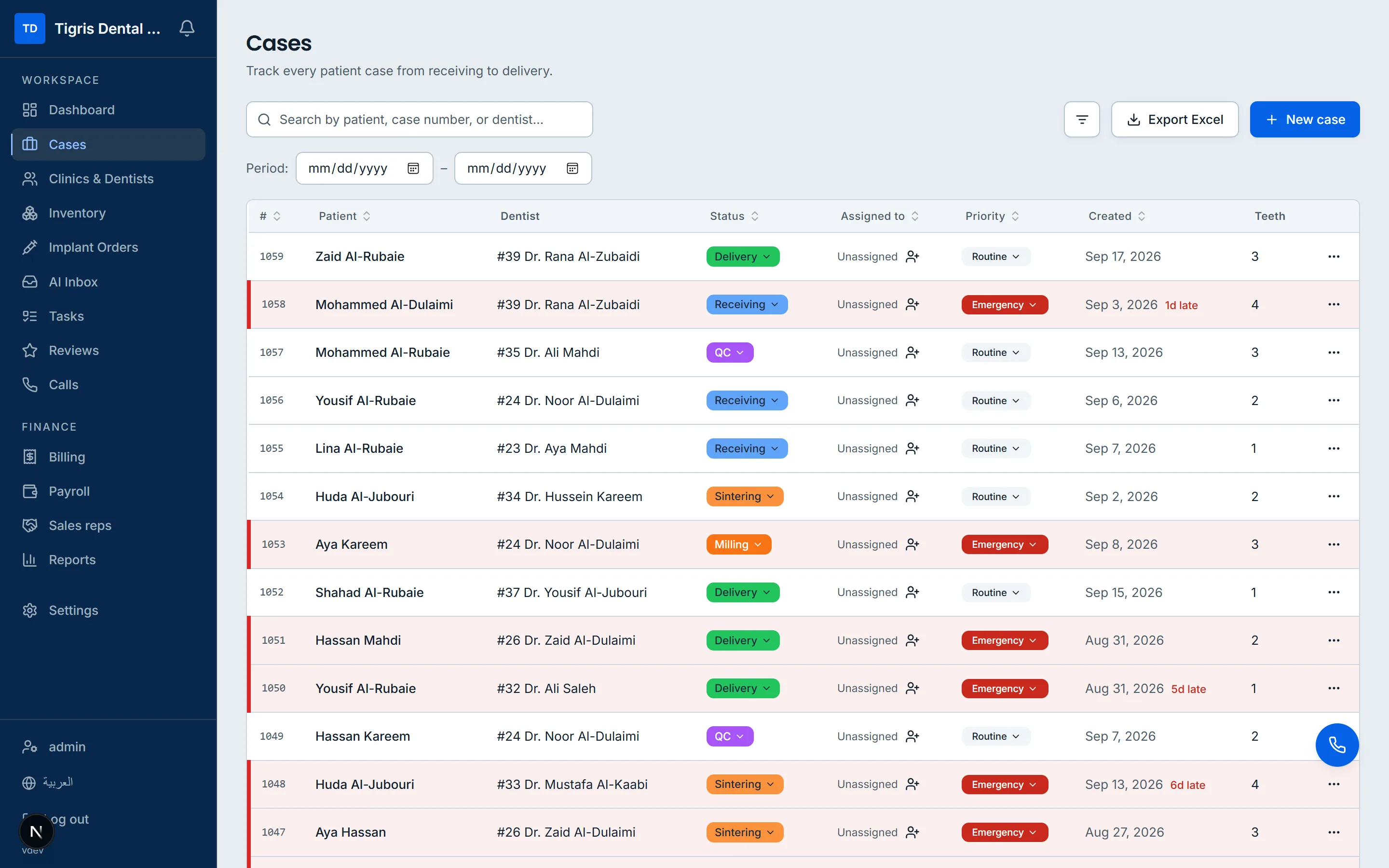
Every case, at a glancePatient, dentist, stage, priority and how many teeth — with anything late marked in red.
Dental laboratory owners in Iraq who are still running cases on paper, WhatsApp and Excel
Lab managers who need to know where every case is and which ones are late
Lab receptionists who log incoming cases and answer 'is it ready?' calls
Dental technicians (CAD designers, millers, ceramists) who need to see their work and their bonus
Lab accountants and cashiers handling invoices, customer balances, expenses and supplier bills
Clinics and private dentists who send work to the lab — they get statements, review links, and (if they run KlickClinic) can send cases straight into the lab
Resellers and white-label partners who sell the program under their own customer's lab name
What is inside
The screens your team will use
Cases
DashboardYour cards, the open / due soon / overdue strip, and who is clocked in
CasesSearch and filter, coloured by urgency, with your default filter saved
New caseA full-page form with the FDI tooth chart
Case detailTeeth, workflow plan, stage timeline, technicians, materials, implant parts, invoice and pay approval
Implant ordersEvery open implant part across the lab, overdue ones coloured
TasksTo-dos with who, status, priority, due date and an optional case
Clinics and dentists
Clinics and dentistsThe full directory of clinics and their dentists
Clinic detailIts dentists and its money, in one view
Dentist detailCases, special prices, history, and a review QR code
ReviewsRequested, answered and pending reviews, and the average rating
Sales repsEach rep's month, dentists and clinics
Money
BillingInvoices, expenses, customers, suppliers, accounts and drafts
StatementsClinic and dentist statements and accounts
My expensesA cash holder's own float and spending
SuppliersEach supplier, their details and statement
ReportsTwelve reports and a custom builder, with print and Excel
Stock
InventoryItems as a list or as pictures, with categories
Item detailStock, movements, photos, disks in use and finished, and the cases it went into
Inventory statisticsMaterial cost by item, category, supplier and month, and the real cost per tooth
Team
AttendanceWho is in today, and each person's month with corrections
PayrollEmployees, approvals, deductions and gifts, and the monthly run
Employee detailPay setup, months and payslips
CallsDialler, who is online, and call history with recordings
Data and updatesBackups, recycle bin, online copy, import and export, and updates with 'What's new'
PrintoutsCase receipt, tray sticker, invoice, statement and stock count sheet
Reports and printed documents
Case receipt — the slip that travels with the case, in a lab copy that names the technician on each step and a dentist copy that does not; carries the tooth chart, the notes, the chosen work steps and a review QR
Tray sticker — a small label with patient, dentist and case number, optionally the restoration/shade, the lab name and a QR, at a width and height you set in millimetres
Invoice — printable sheet and a PDF export of any single invoice
Customer statement of account — previous balance, billed, paid, credits and balance due for any date range, per dentist or per clinic
Bulk statement printing — one sheet per dentist or per clinic for everything the table is showing, in a single print job
Statement PDF export — one PDF per customer named after them, in a folder for the period, with a folder per clinic containing the clinic's sheet plus one for each of its dentists
Supplier statement of account — previous balance, billed and paid in the period, balance due, with print options for totals, bills and payments
Stock count sheet — printable list with a 'counted' column for walking the shelves
Profit and loss report
Sales by customer (grouped by dentist or by clinic)
Sales by sales rep — billed, collected and commission
Who owes (receivables) as of today
How old the debt is (A/R ageing) — 0–30, 31–60, 61–90, 90+, with postponed invoices listed separately
Payroll by employee — base, bonus, gift, deduction, net, remaining
Attendance by employee or by day — hours inside, lateness, shortfall, extra time, exits, auto-closed
Cases by restoration type — teeth and cases, split into implant and non-implant
Repeated cases (remakes) — original case, reason, responsible technician, whether it was charged
Stock value and low stock — quantity on hand, unit cost, stock value, reorder level
Material use and cost — stock out, teeth/units recorded, cost split into settled and pending
Custom table builder — payments, invoices or expenses, grouped by month or by entity
Excel exports of cases, clinics & dentists, and billing
Lab configuration export, as a file for moving to another install or as an Excel workbook to read
Dentist implant-stock PDF — what a dentist is holding at the lab
Money audit log — who recorded, edited, deleted or voided every cash entry
Activity trail — everything created, changed or deleted, filterable by person, type, action and date
At a glance
At a glance
Current version
2.19.0
Runs on
A Windows PC in your own premises, or hosted online
Languages
English and Arabic, with full right-to-left layout