KlickDent
WhatsAppRequest a demo

KlickComp

Stock, sales and money for a dental supplies company.

KlickComp is a complete business program for a company that buys dental materials, equipment and software from suppliers and sells them on to clinics, labs, dentists and shops. It covers the whole chain in one place — the product catalogue and the warehouse, purchase bills and what you owe suppliers, invoices and what customers owe you, sales-rep commission, staff wages, the cash accounts and the reports — in Iraqi dinars alongside dollars and euros, in English and Arabic. It replaces the usual mix of an Excel stock sheet, a paper invoice book, a debtors notebook and a separate accounts file, and it is built for a trading company rather than adapted from a clinic or a lab system.

397 features · 28 groups · v0.2.0

Main features

The things people buy it for

Dinars, dollars and euros — never mixed together

A till, an invoice, a supplier bill, a product price and even a customer's carried-in debt each carry their own currency, and balances are reported one currency at a time. A dollar payment clears dollar debt; it never quietly becomes dinars at a rate somebody guessed.

Exact profit on every line, frozen at the moment of sale

Each invoice line remembers both the price you charged and the average cost the goods actually carried that day. Rename a product or change its price later and last month's margin does not move.

Software licences handled like real stock, with keys that cannot be sold twice

Every dongle or licence key is registered once, shown as free until it goes out, then pinned to the customer who got it. Sell the licence before the keys arrive, register them when they come, and hand one over from the Outgoing list.

A renewal call list so no licence lapses unnoticed

Licences ending soon and perpetual licences whose yearly update fee is due both appear on one list with the customer's phone number as a tap-to-call link. Renewing raises a real invoice on their account.

Commission paid on money collected, not on invoices written

A rep earns when the customer actually pays, and each payment keeps the percentage that applied on the day it arrived — so raising a rep's rate never rewrites what they already earned.

Buying and receiving are two separate events

A supplier bill records the debt the day it is written; stock lands on the shelf and the product's average cost re-bases only when you record what actually arrived — with the batch number read off the box.

Excel that goes both ways

Download a blank template for products, customers or suppliers, fill it in, and the program shows you row by row what it would create or change before anything is written. There is also a spreadsheet-style grid for editing many rows at once inside the program.

Runs on your own Windows PC, with no internet needed

One Setup.exe installs the database, the program and a Windows service that starts with the computer. Staff on the same office network open it in a browser on any PC, phone or tablet. The same program also runs online when you want it to.

English and Arabic, properly right-to-left

Every screen, dialog, report and printed page exists in both languages, and switching flips the whole layout rather than just translating the words. Numbers stay in Western digits so figures read the same to everyone.

Everything is traceable, and everything is backed up

Customer and supplier statements, a ledger behind every cash account, and an activity log of every change with who made it — plus one-click database backups you can download, restore, or leave to run on a schedule.

Who it is for

Stock, sales and money for a dental supplies company.

Which one do I need?

  • Dental supplies trading companies and distributors in Iraq that buy in USD/EUR and sell in IQD
  • Companies that sell dental software licences (dongles and download licences) and have to track keys, terms and renewals
  • Owners who need to know exactly what each sale earned, not just what it billed
  • Businesses running a sales-rep team paid on money collected rather than money invoiced
  • Warehouses where goods are ordered long before they arrive and delivered long after they are invoiced
  • Offices that must keep working when the internet is down, on their own Windows PC
  • Arabic-speaking staff who need the whole program right-to-left, with English available on the same screen for anyone who prefers it

What is inside

The screens your team will use

  • Dashboard (/) — eight tiles: today's trading, receivables, payables, low stock, expiring batches, renewals to call, top sellers, rep leaderboard
  • Customer centre (/customers) — tabs: Directory and Balances
  • Customer detail (/customers/<id>) — profile, financials panel, licences, recent invoices/payments/credit notes
  • Customer price list (/customers/<id>/pricing) — per-product special prices and the blanket adjustment
  • Bulk edit customers (/customers/bulk) — spreadsheet-style grid
  • Invoices centre (/sales) — tabs: Invoices, Proposals, Credit notes
  • New invoice (/sales/new) — the full-page invoice builder
  • Invoice detail (/sales/<id>) — lines, totals, payments applied, delivery state
  • Credit note detail (/sales/credit-notes/<id>)
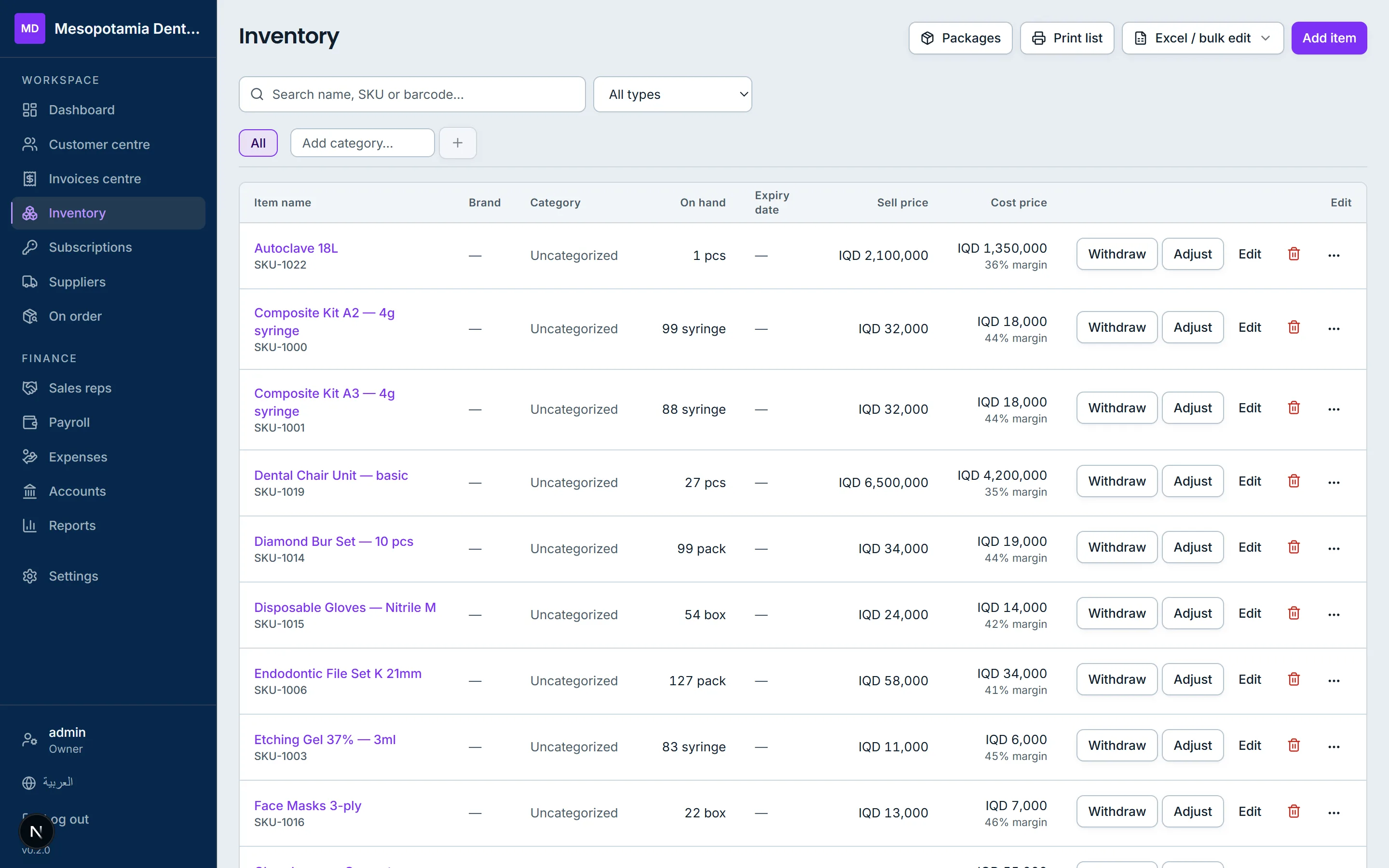
  • Inventory (/inventory) — category tabs, brands pane, search, type filter, stock and value
  • Product detail (/inventory/<itemId>) — stock tiles, movement ledger, batches, photos, purchases & sales, licence keys
  • Packages (/inventory/packages) — bundle builder and list
  • Stock count sheet (/inventory/print)
  • Bulk edit products (/inventory/bulk)
  • Subscriptions (/subscriptions) — licences sold, statuses, renewal call list, renew dialog
  • Suppliers (/suppliers) — balances, recent bills, payments
  • Supplier detail (/suppliers/<id>) — statement, bills, payments
  • Supplier catalogue (/suppliers/<id>/catalogue)
  • Purchase bills (/suppliers/bills) and bill detail (/suppliers/bills/<billId>)
  • New purchase bill (/suppliers/bills/new) — the full-page bill builder
  • Bulk edit suppliers (/suppliers/bulk)
  • On order (/on-order) — tabs: Incoming from suppliers, Outgoing to customers
  • Sales reps (/sales-reps) and rep detail (/sales-reps/<id>) with invoices, collections and payouts tabs
  • Payroll (/payroll) and staff detail (/payroll/<userId>)
  • Expenses (/expenses)
  • Accounts (/accounting) — the chart of accounts, tills, buckets, cash profit and ledgers
  • Reports (/reports) — the reports centre with picker, period control, table, print and Excel
  • Settings (/settings) — General
  • Settings → Roles (/settings/roles)
  • Settings → Data (/settings/data) — backups and device notifications
  • Settings → Activity (/settings/activity) — the activity log
  • Sign in (/login) and forced password change (/change-password)
  • Activate this computer (/activate)
  • Print: invoice (/print/invoice/<id>), statement (/print/statement/<customerId>), proposal (/print/proposal/<id>)
  • Redirects that keep every old link working: /billing, /sales/balances, /sales/credit-notes, /settings/users, /suppliers/on-order

Reports and printed documents

  • Profit & Loss (cash basis) — collected, paid to suppliers, other expenses, rep commission, wages, net; owner draws shown beside it, never inside it
  • Expenses by account — money spent per expense bucket in the period
  • Sales by customer (groupable by customer or city)
  • Sales by product (groupable by product, category or brand)
  • Sales by rep — invoiced, collected and commission earned
  • Profit margin by product (groupable by product, category or brand)
  • Receivables aging — current, 31-60, 61-90, over 90 days
  • Payables by currency — what you owe each supplier, subtotalled per currency
  • Stock valuation — quantity and value at weighted-average cost, flagging low stock
  • Expiring lots — batches expired or expiring within the window
  • Excel (.xlsx) export of every report
  • Excel template and data export for products, customers and suppliers
  • Printed sales invoice, with a void notice on a cancelled one
  • Printed customer statement, with a section per currency
  • Printed supplier statement, with selectable sections
  • Printed price proposal / quotation
  • Printed stock count sheet with a blank Counted column

At a glance

At a glance
Current version0.2.0
Runs onA Windows PC in your own premises, or hosted online
LanguagesEnglish and Arabic, with full right-to-left layout
CurrencyIraqi dinar (IQD)
Needs internetNot for daily work; only for connected features
DatabasePostgreSQL 18, installed for you
BackupsBuilt in, on a schedule, to a file you keep
Other devicesPhones and tablets, over your own wi-fi

KlickComp tutorials

Every feature

The complete list, read out of the program’s own code. Search it, or open any group.

Showing 397 of 397

See KlickComp on your own case

Tell us what you use today and what you would like to fix. We will show you the part that matters to you and answer plainly whether it fits.