KlickDent
WhatsAppRequest a demo

KlickClinic

Dental clinic software built around the tooth chart

KlickClinic is a complete management system for a single dental clinic, built around a per-patient interactive dental chart. It replaces the mix of paper case sheets, a wall calendar, an Excel cash book and a separate payroll notebook that most clinics run on — and it replaces older Iraqi clinic packages such as ClinicVector and EasyClinic, both of which have had real patient histories imported into it. It runs on the clinic's own Windows PC with no internet, or hosted online, from the same program.

378 features · 22 groups · v1.30.0

Main features

The things people buy it for

A dental chart that shows the whole mouth at once

Open a patient and their chart shows every tooth and everything planned or done on it, in one full-mouth view with no tabs to hunt through. A simple four-colour code says it at a glance: red is planned, blue was done here, green was done elsewhere and is fine, black was done elsewhere and needs replacing.

Mixed dentition for children, drawn from their date of birth

A child's chart opens with the right mix of baby and adult teeth already in place, worked out from their age against the standard eruption table. Teeth that have not come through yet, are still coming, or have been shed are drawn by shape, so colour keeps its one clinical meaning.

Orthodontics is charted, not written in the notes

An ortho case records its appliance once — arches, system, prescription, extractions, retention — then each activation records what actually happened: brackets placed, a wire changed, elastics started. The chart draws what is in the mouth, and a slider steps back through every visit.

Money that adds up, in IQD

Patient balances, payments split between dentists, cash tills, card tills, expenses, supplier bills and monthly payroll all live in one set of books. A reconciliation line on the Finance page tells you when something was recorded on only one side.

Send cases to your lab, and track the bill that comes back

Raise a lab order from the chart, attach the scans, and send it to a connected lab. Their status updates and their invoices come back on their own — and approving an invoice charges each dentist their share of the lab cost off their commission.

Works with no internet at all

One Windows installer puts the whole program, its database and its web server on the clinic's own PC and runs it as a service that starts with the machine. Staff reach it from phones and tablets on the clinic's own wi-fi. Nothing about daily work needs the internet.

English and Arabic, right to left, everywhere

Every label, button, message and printed document exists in both languages, and the whole layout mirrors properly in Arabic. Each person picks their own language from the sidebar.

Almost nothing is really deleted

Removed treatments and visits sit in a Recently Deleted list for 90 days and come back complete, with their sessions and their money. The activity log records everything created, changed or deleted, with who and when, and an owner can restore from it.

Backups you are actually reminded to take

The program can back itself up on a schedule, and once a day it offers the first admin who opens it a one-click copy saved onto the computer they are sitting at. Once a week it offers the bigger backup that includes x-rays and photos — the only copy that has the images in it.

Each person sees exactly what their job needs

Eight ready-made roles, each module set to hidden, view or edit, plus separate switches for things like seeing patient phone numbers or the whole practice's money. A dentist can see their own earnings without seeing the clinic's books.

Who it is for

Dental clinic software built around the tooth chart

Which one do I need?

  • Single-site dental clinics in Iraq that want one program for charts, money and staff
  • Clinic owners who need to see what each dentist produced, collected and is owed each month
  • Dentists who chart tooth by tooth and want the plan, the visits and the price in one place
  • Orthodontists treating children through mixed dentition and tracking cases stage by stage
  • Front-desk staff booking appointments, taking payments in IQD and calling patients back
  • Clinics that send crown, bridge and denture work to a dental lab and want the case and the bill tracked
  • Clinics with unreliable internet that need the software to keep working offline
  • Arabic-speaking teams who need the whole program in Arabic, right to left
  • Resellers selling the software white-label under their own clinic customers' names

What is inside

The screens your team will use

  • Sign in (/login) — username and password, optional Google sign-in, optional NFC card tap, forgot-password request
  • Create account request (/signup) — optional, approved by an admin
  • Activate this PC (/activate) — machine id, licence key or module key
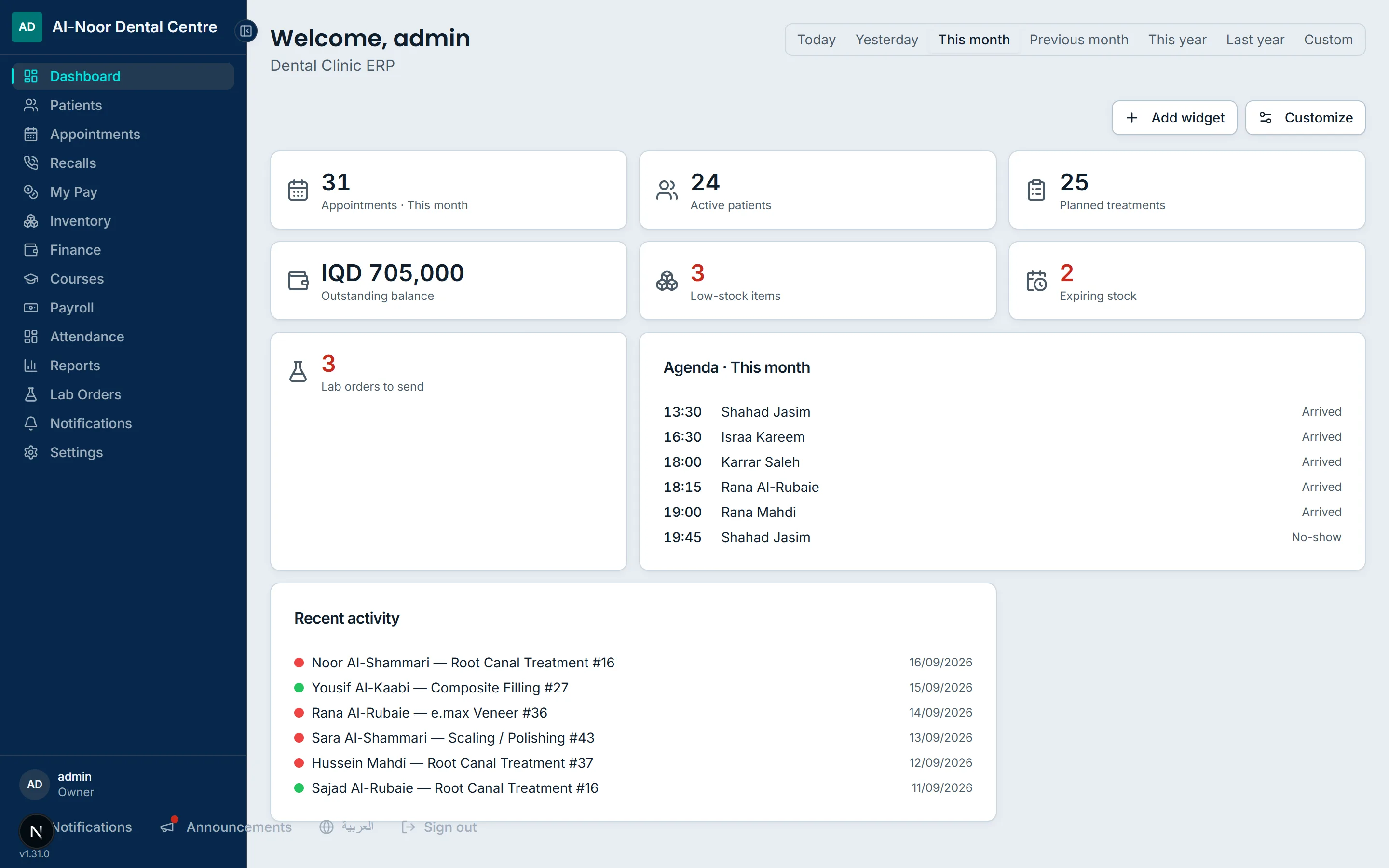
  • Dashboard (/) — customisable widgets with a period picker
  • Patients (/patients) — search, sort, filters, new patient
  • Patient chart (/patients/[id]) — the odontogram, treatment plans, visits, medical history, images, prescriptions, referrals
  • Patient billing (/patients/[id]/billing) — balance, billed treatments, invoices, payments
  • Printable chart sheet (/patients/[id]/print)
  • Printable receipt (/patients/[id]/billing/print)
  • Printable prescription (/patients/[id]/prescriptions/[id]/print)
  • Printable referral letter (/patients/[id]/referrals/[id]/print)
  • Appointments (/appointments) — day, week and month calendar
  • Recalls (/recalls) — due now and upcoming follow-ups
  • Inventory (/inventory) and item detail (/inventory/[id])
  • Printable stock list and daily consumption sheet (/inventory/print)
  • Finance (/finance) — patient balances, expenses, accounts, suppliers, money history
  • Supplier detail (/finance/suppliers/[id])
  • Courses (/courses) and course detail (/courses/[id])
  • Payroll (/payroll) — employees, gifts and expenses, monthly run
  • Employee or dentist pay detail (/payroll/[payeeType]/[id]) — also reachable as 'My Pay'
  • Attendance (/attendance) and a person's month (/attendance/[personId])
  • Reports (/reports) — cash flow, activity, by dentist, treatments by type
  • Lab orders (/lab-orders), new order (/lab-orders/new), order detail and edit
  • Lab invoices (/lab-invoices), invoice detail, owed by dentist (/lab-invoices/owed), monthly statement (/lab-invoices/statement)
  • Dentists (/dentists) and dentist finance (/dentists/[id])
  • Treatments catalogue (/procedures) and treatment detail (/procedures/[id])
  • Notifications (/notifications)
  • My account (/account)
  • Change password (/change-password)
  • Settings — clinic details (/settings)
  • Settings — treatments library (/settings/treatments)
  • Settings — clinical library (/settings/clinical-library)
  • Settings — lab and hub connection (/settings/lab)
  • Settings — hardware / NFC reader (/settings/hardware)
  • Settings — attendance (/settings/attendance)
  • Settings — printing (/settings/printing)
  • Settings — data and backups (/settings/data)
  • Settings — activity log (/settings/activity)
  • Settings — recently deleted (/settings/recycle-bin)
  • Settings — roles and permissions (/settings/roles)

Reports and printed documents

  • Cash flow report — collections, expenses (overhead and suppliers), payroll paid out, net, for any period
  • Activity report — new patients, all-time outstanding, treatments created, visits performed
  • By-dentist report — patients, treatments, visits, collected and commission per dentist
  • Treatments by type, and the same one level finer per individual treatment
  • Drill-down on any report figure to the payments, visits or treatments behind it
  • Own-figures report for a dentist (their collected, commission, patients and treatment mix)
  • Customisable dashboard with thirteen widgets and a period picker
  • Printable dental chart sheet
  • Printable patient payment receipt
  • Printable prescription on the clinic letterhead
  • Printable referral letter (lab test, GP, specialist)
  • Printable inventory stock list
  • Printable daily consumption sheet
  • Printable monthly lab statement (brought forward, charged, paid, carried forward)
  • Per-account ledger showing every movement behind a till's balance
  • Money history — every money change with who, when, before and after
  • Activity log — everything created, changed or deleted across the clinic
  • Attendance day board and per-person month with twelve figures
  • Payslip history and monthly payroll run figures per employee
  • Patient balances list and top-debtors view

At a glance

At a glance
Current version1.30.0
Runs onA Windows PC in your own premises, or hosted online
LanguagesEnglish and Arabic, with full right-to-left layout
CurrencyIraqi dinar (IQD)
Needs internetNot for daily work; only for connected features
DatabasePostgreSQL 18, installed for you
BackupsBuilt in, on a schedule, to a file you keep
Other devicesPhones and tablets, over your own wi-fi

KlickClinic tutorials

Every feature

The complete list, read out of the program’s own code. Search it, or open any group.

Showing 378 of 378

See KlickClinic on your own case

Tell us what you use today and what you would like to fix. We will show you the part that matters to you and answer plainly whether it fits.